Frequently asked questions
What teams ask before they choose a Confluence app. For step-by-step instructions, see the product documentation.
Confluence questions
Can a Page Properties Report be filtered and grouped?
Can a Page Properties Report be filtered and grouped?
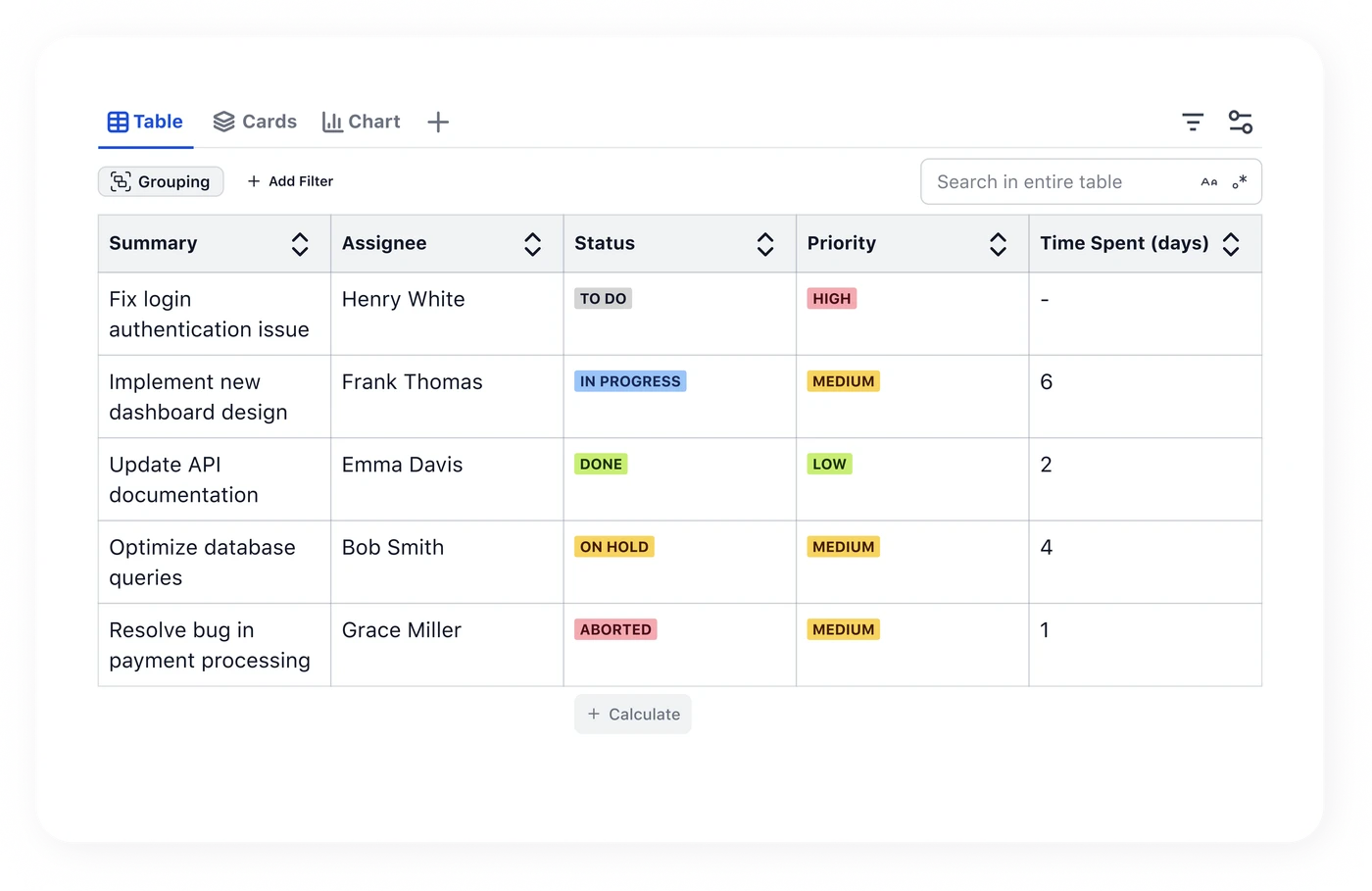
Yes. Aura Table Filter lets you filter, sort, group and search a Confluence Page Properties Report just like a regular table. You place the report inside the “Aura - Table Filter” macro and publish the page. The underlying page properties tables need a header row or header column and unique column names.
Can Confluence be used as a company intranet?
Can Confluence be used as a company intranet?
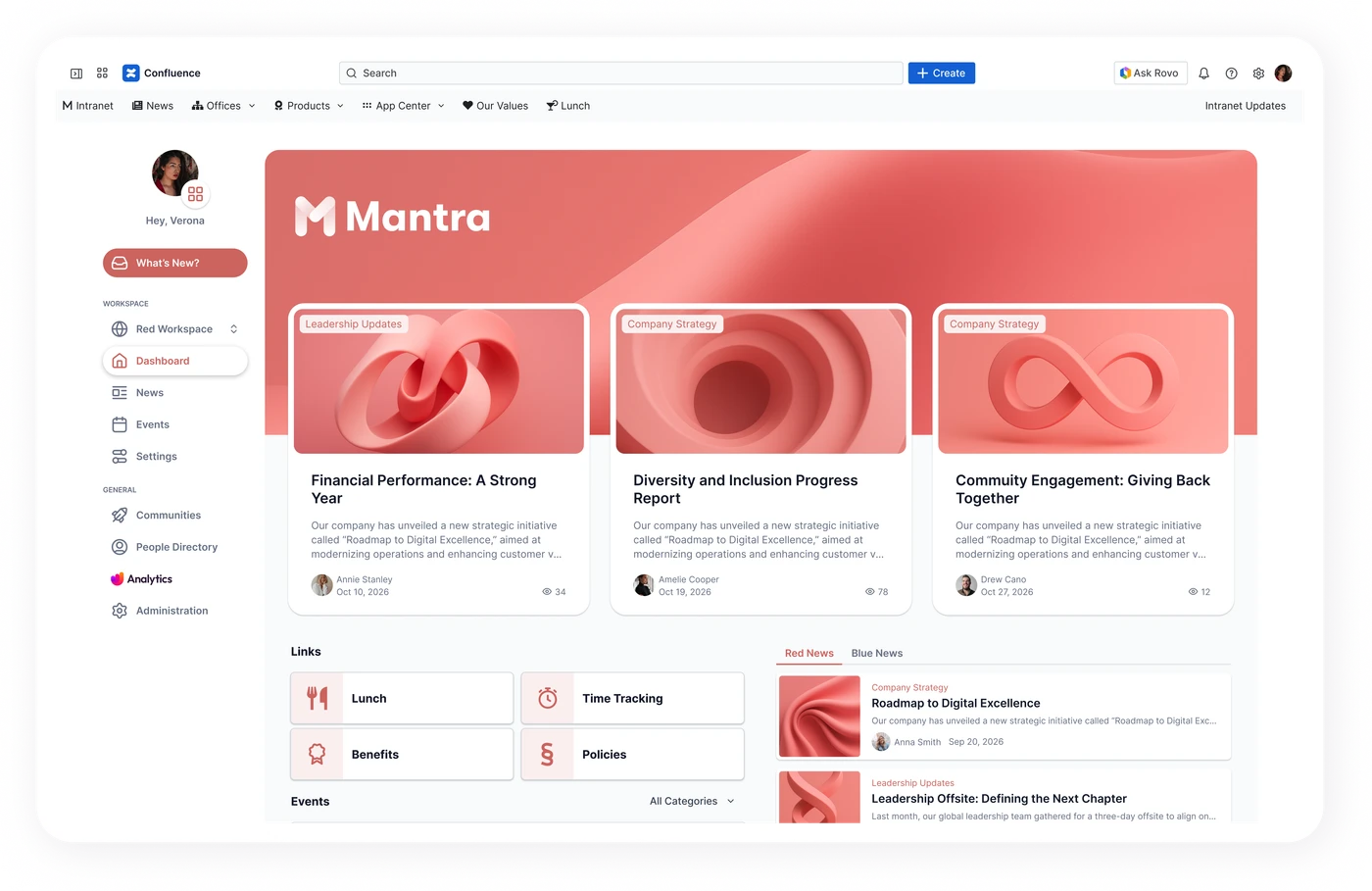
Yes. Confluence can serve as a company intranet, and Mantra turns a Confluence site into a branded intranet with workspaces for locations or subsidiaries, news feeds, posts, events, communities, a people directory and a navigation bar across Confluence. Mantra keeps news, posts and event content in your Confluence instance.
Can you filter a table in Confluence Cloud without an app?
Can you filter a table in Confluence Cloud without an app?
No. Confluence Cloud tables can be sorted by column, but not filtered. Aura Table Filter is a free app that adds filtering to standard Confluence tables and Page Properties Reports. You can filter by column, sort, group rows, search with case sensitivity or regex, and hide columns. Saved views keep their filters, so readers see the same result each time.
Requirements and fit
Can a Mantra intranet be branded, including dark mode?
Can a Mantra intranet be branded, including dark mode?
Yes. Mantra lets admins brand each workspace with a primary color for light and dark mode, a gray or minimal background, a compact or default header, a logo, a header image with an overlay color, and a title and subtitle in their own colors. Navigation menu background and hover colors are also set separately for light and dark mode.
Can Confluence macros be used in Mantra news?
Can Confluence macros be used in Mantra news?
Partly. Mantra displays news written as Confluence pages or blog posts with standard elements such as text formatting, images, videos, links, tables, layouts, panels and expands. Images inside tables and layouts appear only as download links, some elements such as Jira and Confluence embeds or a table of contents are not supported, and neither are third-party macros. Mantra’s own news editor uses text and image elements.
Can filtered tables be exported to PDF or CSV?
Can filtered tables be exported to PDF or CSV?
Yes. Each Aura Table Filter view can be exported as a PDF, printed, or downloaded as a CSV file from the options menu. The export includes the view’s active filters and sorting, so you get the rows you see.
Can Karma pages include Jira issues and other Confluence macros?
Can Karma pages include Jira issues and other Confluence macros?
Yes, with Karma Pro. The Confluence Content element embeds Confluence pages and blog posts into a Karma page, which lets you show macros such as tables, roadmaps and Jira issues inside your layout. Karma Pro also adds an Embed element for external content from Microsoft 365, Google, Trello, Figma, Miro and custom URLs. Karma Pro requires both Karma and Aura Formatting to be licensed.
Can Mantra show several announcements at once?
Can Mantra show several announcements at once?
Yes. Mantra’s Announcements module shows several announcements at once, in the order they were added. Each one has a type (Info, Warning, Critical or Resolved) that can change as a situation develops, and a display-until date after which it is hidden automatically. Creating or updating an announcement notifies users, and only admins and Mantra Super Users can add them.
Can one source table feed several filtered views or charts?
Can one source table feed several filtered views or charts?
Yes. Aura Table Filter can show several views of the same Confluence table, each in its own tab with its own filters, sorting, grouping and visualization. A view can be a table or a chart, and hidden columns are saved per view. Each view can also be exported with its active filters and sorting.
Can people without design skills build pages with Karma?
Can people without design skills build pages with Karma?
Yes. Karma is a drag-and-drop page builder, so you build a page by adding ready-made sections from more than 200 predefined presets and then editing their text and images in place. Elements such as text, images, buttons, icons and videos are dragged from the sidebar into the page. The editor shows the page as readers will see it, and undo and redo are always at hand.
Can tables from several pages be combined into one view?
Can tables from several pages be combined into one view?
Yes. Aura Table Filter combines tables from different Confluence pages into one filterable table. You wrap each source table in the “Aura - Table Excerpt” macro with the same excerpt name, then add the “Aura - Table Excerpt Include” macro where the combined table should appear. It collects all excerpts with that name automatically, and source tables can be hidden on their own pages.
Can we keep a consistent company look across spaces with Karma?
Can we keep a consistent company look across spaces with Karma?
Yes, with Karma Pro. Super Users can save page and section presets in your company design that other users reuse when they build new pages. You can also upload up to four custom font families and up to 40 custom SVG icons, and use your Aura Formatting color palettes directly in Karma. Karma Pro requires both Karma and Aura Formatting to be licensed.
Do I need Confluence Premium or Standard to use Mantra?
Do I need Confluence Premium or Standard to use Mantra?
No. Mantra works on every Confluence Cloud plan, including Free and Standard, so there is no need for Confluence Premium. One exception: Mantra communities require Confluence Standard or higher and are not available on Confluence Free.
Do Karma and Aura Formatting work on public Confluence pages?
Do Karma and Aura Formatting work on public Confluence pages?
Karma and Aura Formatting work in Confluence spaces that are open to anonymous visitors, such as public product documentation. Public links to individual pages are different: Confluence hides all third-party macros there, including Karma and Aura Formatting. To publish a help center, knowledge base or documentation as a themed public site, Spacecraft, also from Seibert, publishes one or more spaces and is compatible with Aura and Karma.
Do Mantra events sync with Outlook or Google Calendar?
Do Mantra events sync with Outlook or Google Calendar?
Yes. Mantra events sync with Outlook and Google Calendar and send invitations automatically. When someone joins, their status updates, they receive a confirmation email and the event appears in their personal calendar. Organizers track attendance in real time, and each event can be open, limited to a maximum number of participants, or invite-only.
Does Aura Table Filter work with Jira macros in table cells?
Does Aura Table Filter work with Jira macros in table cells?
No. Aura Table Filter does not support the Jira macro as a macro integration. The documented integrations are Page Properties Reports and table excerpts. For filtering, Aura Table Filter supports rich text, numbers, dates, statuses, users and task items.
Does Karma come with templates, and can we save our own?
Does Karma come with templates, and can we save our own?
Yes. Karma comes with more than 200 predefined section and page presets in categories such as headers, galleries, team profiles, FAQs and changelogs. Saving your own page and section presets requires Karma Pro, which also unlocks the full preset library. Only Karma Super Users can save and delete custom presets, which other users can then reuse. You can store up to 100 custom section presets and sort presets into up to 10 categories.
Does Mantra include an employee directory?
Does Mantra include an employee directory?
Yes. Mantra includes a people directory that is off by default; admins turn it on, define its columns and field types, and choose in the Profile Editor which fields profiles show. Employees can filter colleagues by fields such as skills or languages. Profile date fields also drive the Celebrations module for birthdays, work anniversaries and new employee welcomes. Once enabled, directory data is stored on Mantra’s servers in Frankfurt, Germany.
How do Aura Workflow pages look in PDF or Word exports?
How do Aura Workflow pages look in PDF or Word exports?
Aura Workflow information placed on a page with its macros appears as text in exported documents. The Official version macro keeps the version number in exports, and older page revisions show the version that was official at that time. On published pages, Metadata macro values are locked in at publish time, so exports with K15T Scroll Word or PDF Exporter show the values for the exported version.
How does Mantra notify employees about new content?
How does Mantra notify employees about new content?
Mantra collects notifications in its What’s New center, where the For You tab lists news from subscribed feeds, highlighted and forced news, announcements, mentions, comments on your content, event invitations and community activity. Admins can turn on email notifications and also send selected news, highlighted news and announcements by email. Unread news carry an indicator that disappears once they are opened.
Is Mantra available in multiple languages?
Is Mantra available in multiple languages?
Yes. The Mantra interface is available in English and German and follows the language in each user’s Confluence personal settings. News and posts can be translated on demand with DeepL, which requires an API token from a DeepL Pro account. Translations are cached, and users can switch between the original and the translated version.
Is there a mobile app for the Mantra intranet?
Is there a mobile app for the Mantra intranet?
Yes. The Mantra Employee App for iOS and Android gives employees access to news, events and posts on the go, and is available on the Apple App Store and Google Play. Users connect it to their Atlassian account and scan a QR code shown in Mantra. If the Mobile option is missing, it is enabled through a support request.
What can Aura Analytics measure, and do I need Mantra for it?
What can Aura Analytics measure, and do I need Mantra for it?
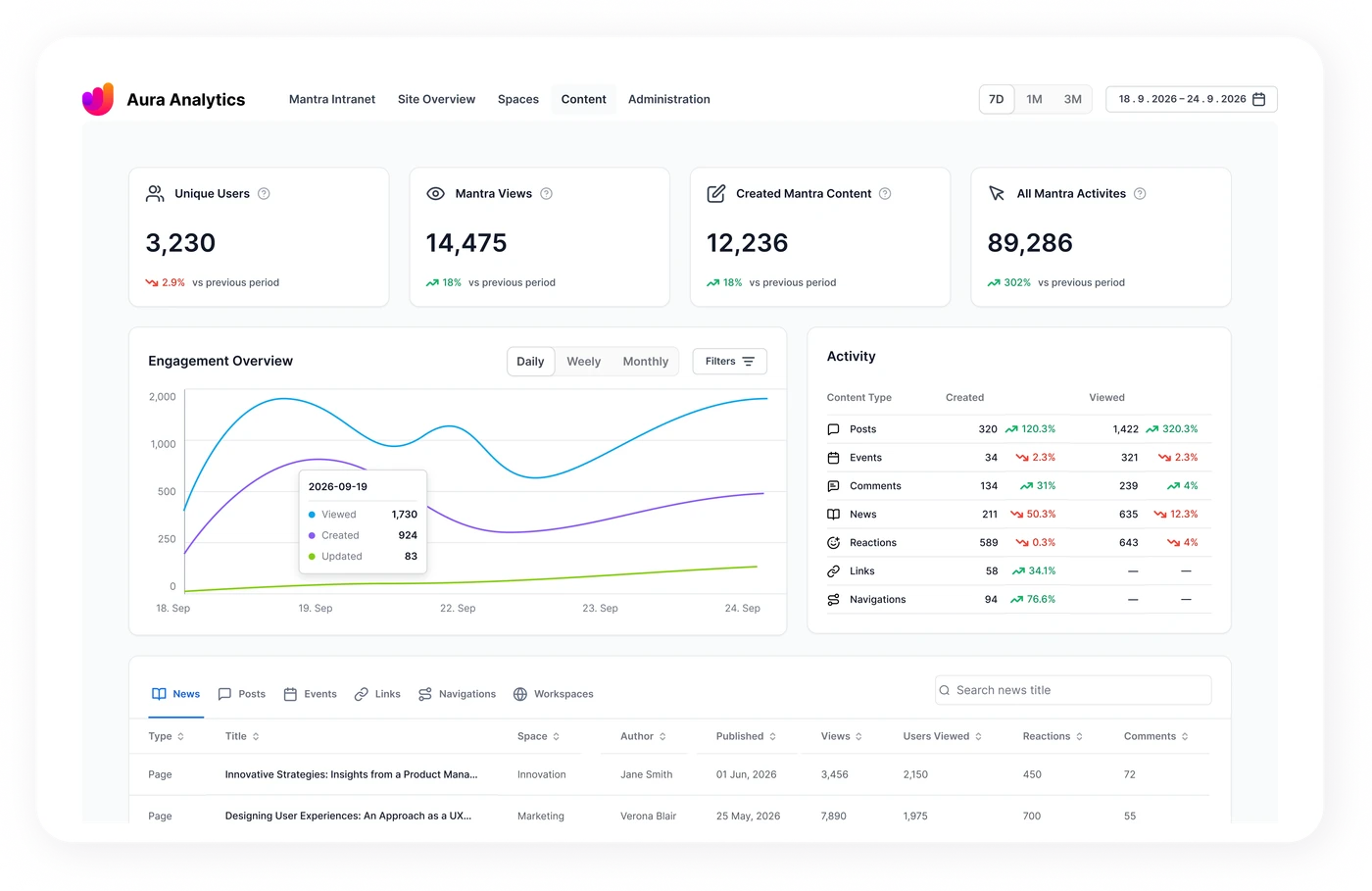
Aura Analytics measures activity and engagement across your Confluence Cloud site, at site, space and content level, and it does not require Mantra. It shows active users, views, unique viewers, created and updated content, likes and comments for pages, blog posts and live docs. For databases, whiteboards and smart links it counts creation only. Every metric is compared with the previous period, and data is recorded from installation onward. Mantra is only needed for the additional intranet dashboard.
What is the difference between a workspace and a community in Mantra?
What is the difference between a workspace and a community in Mantra?
In Mantra, workspaces segment the intranet by organizational unit, such as locations or subsidiaries, while communities are built on Confluence spaces for teams, projects or interest groups. Each workspace has its own branding and content, and admins decide with conditions who sees it. Communities come in three types (public, moderated and private) with followers, members and admins, and users join or leave them voluntarily.
What is the difference between header news and news in Mantra?
What is the difference between header news and news in Mantra?
In Mantra, Header News is the fixed top module of a workspace dashboard for key company news, with layouts for up to 18 items, while the News module shows less critical team updates. Individual news can also be pinned to the top of a news module or highlighted until a set date, and admins can limit both options to selected Confluence groups.
Which native Confluence macros work inside Aura Formatting macros?
Which native Confluence macros work inside Aura Formatting macros?
It depends on the Aura Formatting macro, and the documentation lists compatible content and macros per macro, for example for Background Content, Expand and Tab Group. Inside Aura Background Content, macros such as Include Page, Children Display, Content by Label, Roadmap Planner and Jira Charts work, while Chart, Excerpt, Iframe, Jira, Page Properties, Page Tree and Table of Contents do not. Compatibility can change with new Confluence Cloud releases from Atlassian.
Who can create a community in Mantra, and who can post in it?
Who can create a community in Mantra, and who can post in it?
By default, everyone can create a Mantra community, either as a new Confluence space or from an existing one, and admins can limit this to specific groups. Public communities are open to all users for reading and writing, moderated communities can be read by everyone but only selected members create content, and private communities are visible only to users the community admin adds. Communities require Confluence Standard or higher.
Security and administration
Are all Aura Apps built on Atlassian Forge?
Are all Aura Apps built on Atlassian Forge?
All six Aura Apps are registered on Atlassian Forge, but not all of them run fully on it yet. Karma, Aura Table Filter, Aura Workflow and Aura Analytics run entirely on Forge. Mantra and Aura Formatting are Connect on Forge apps, which means they still run some Connect modules. Aura Table Filter and Aura Analytics also carry Atlassian’s Runs on Atlassian badge.
Can Mantra sync profile fields from Microsoft Entra ID?
Can Mantra sync profile fields from Microsoft Entra ID?
Yes. Mantra syncs profile fields from Microsoft Entra ID (formerly Azure AD) for organizations that use Atlassian Guard and Entra ID. Admins map directory columns to Entra properties and run the sync, which can take minutes to hours. Collections, booleans and object properties are not supported, and some fields need a SharePoint Online license. If the option is missing, it is enabled through a support request.
Can Mantra workspaces and navigation menus be restricted to specific groups?
Can Mantra workspaces and navigation menus be restricted to specific groups?
No. Mantra workspaces and navigation menus are personalized, not restricted. Each supports up to three conditions based on Confluence groups or Mantra profile fields, and Mantra shows it only to matching users, but the underlying data stays readable to all users of the instance. Confidential content belongs in private communities or restricted Confluence spaces.
Can people manage Mantra without Confluence admin rights?
Can people manage Mantra without Confluence admin rights?
Yes. A Confluence admin can name a group of Mantra Super Users who set up and maintain Mantra, including workspaces, themes, dashboards and navigation, without full Confluence admin permissions. Permissions are cached for up to one hour, so someone whose access was revoked can keep administering Mantra for up to an hour in an active session.
Can posts in Mantra be limited or turned off?
Can posts in Mantra be limited or turned off?
Yes. Mantra admins choose which post types users can create, which groups see the post prompt, and whether the Posts module appears in each workspace’s sidebar. Creators and admins can edit or delete posts. In moderated communities, only selected members create content.
Where is Mantra data stored?
Where is Mantra data stored?
Mantra stores most of its content in your Confluence instance: news, posts, polls, comments, and event descriptions and media. Some configuration and metadata is stored on Mantra’s servers in Frankfurt, Germany, on Google Cloud Platform. This covers administration and workspace settings, likes and reactions, and event dates. No personal information is stored there by default. The optional people directory, which is off by default, also stores its data on these servers once enabled.
Who can edit Karma pages and manage templates?
Who can edit Karma pages and manage templates?
Karma pages are edited in the Confluence page editor, where Karma is inserted as a macro, and viewing or editing them requires a Karma license. Managing templates is reserved for Karma Super Users, who can create, edit and delete custom page and section presets, a Karma Pro feature. Confluence administrators assign Super Users by entering a Confluence group in the Karma configuration. All current and future members of that group become Super Users automatically.
Who can write news in Mantra, and does news respect Confluence permissions?
Who can write news in Mantra, and does news respect Confluence permissions?
Yes. Mantra shows news based on each user’s Confluence permissions, and the Write News button appears for anyone with edit permission in a space configured as a news source. Admins can limit pinning and highlighting news to selected Confluence groups, and only admins and Mantra Super Users can add announcements. In communities, members and admins create content, while followers can comment and like.
Rollout and adoption
Can Mantra become the Confluence start page?
Can Mantra become the Confluence start page?
Yes. Admins can make Mantra the Confluence start page in two ways: replace the Confluence For you view with Mantra, or keep For you and redirect the Confluence logo to Mantra through a landing space with the Mantra Redirect To Home macro. A direct link to Mantra can also be added to the navigation bar.
How is a workflow applied in Aura Workflow: per page, per space or automatically?
How is a workflow applied in Aura Workflow: per page, per space or automatically?
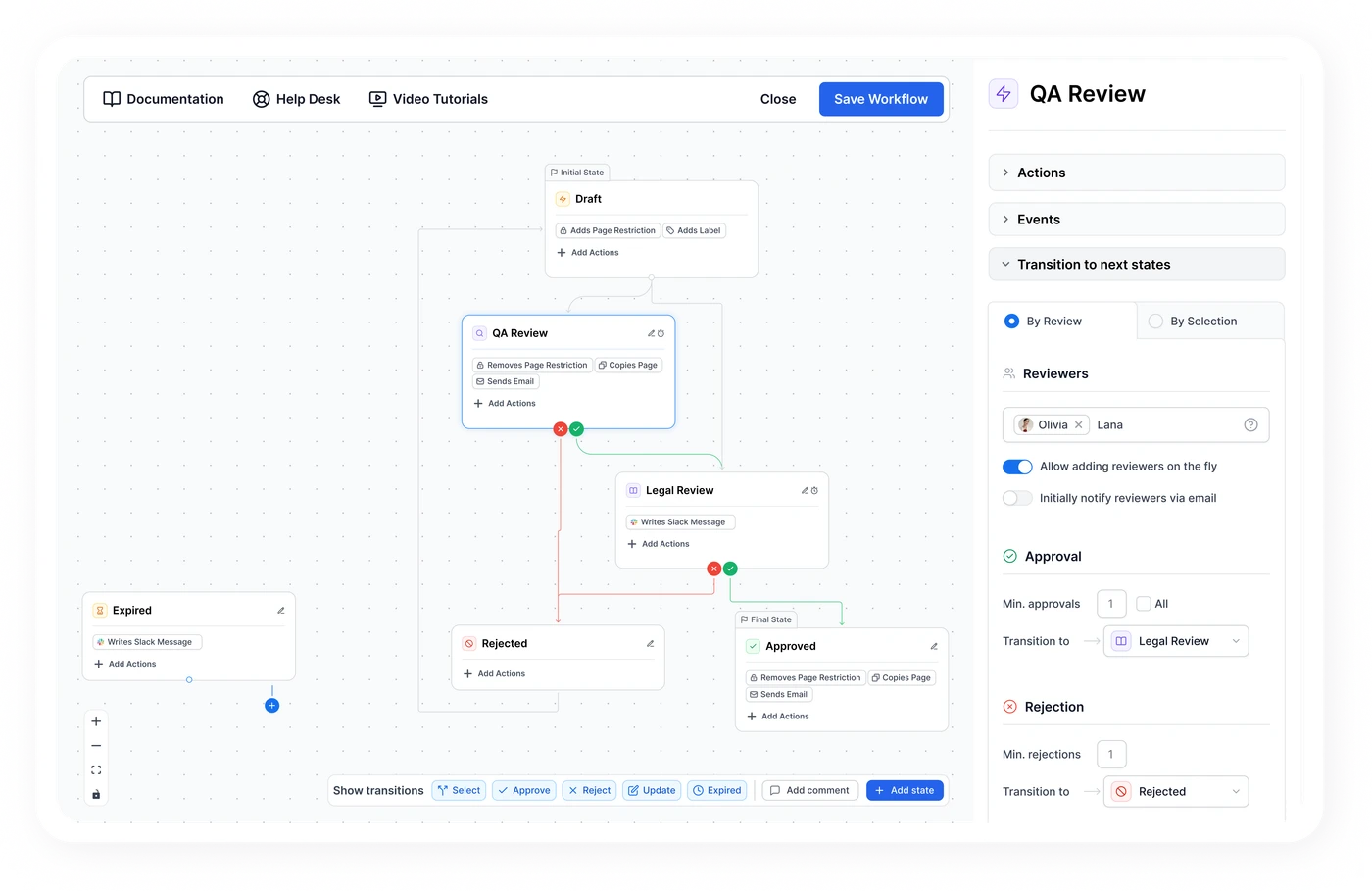
Aura Workflow supports all three. Page editors can add a workflow to a single page from the byline, and space admins can bulk apply it to selected pages, a whole space or pages with certain labels. Auto-apply rules attach a workflow to new pages based on labels or as a fallback workflow. Bulk apply replaces existing workflows and drops pending approvals, and existing pages only receive auto-apply workflows through a bulk apply.
How long does it take to launch an intranet in Confluence?
How long does it take to launch an intranet in Confluence?
Setting up Mantra itself is quick; how long a launch takes depends mostly on the size of the organization and how much structure and content it plans. Mantra installs from the Atlassian Marketplace and usually creates its database spaces in Confluence automatically. Until the intranet is ready, admins can limit every workspace and navigation menu to one group and name Mantra Super Users to share the setup without full Confluence admin rights. For a larger company, most of the time goes into planning workspaces, navigation and launch content.
What can Aura Analytics measure about intranet usage?
What can Aura Analytics measure about intranet usage?
With Mantra connected, Aura Analytics adds a free Mantra Intranet dashboard that shows unique users, Mantra views, created content and all tracked activities, each compared with the previous period. It charts views, creations and reactions over time, and lists news, posts, events, links, navigation entries and workspaces with their views, clicks or participants. A Confluence administrator connects the two apps once, and data is captured from that point onward.
Comparisons and switching
Can we migrate from Comala Document Management to Aura Workflow?
Can we migrate from Comala Document Management to Aura Workflow?
Yes. Aura Workflow migrates workflow assignments and each page’s current state from Comala Document Management, both Cloud and Data Center. Approval records, previous reviewers and transition logs stay in Comala, and pages arrive with no pending reviewers or approvals in progress. A site admin runs a migration script from support, reviews the generated file and uploads it in Aura Workflow. The migration can be paused, resumed and safely run again.
Can we migrate from Stiltsoft Table Filter?
Can we migrate from Stiltsoft Table Filter?
Yes. The Aura Table Filter migration wizard converts the Stiltsoft macros Table Filter, Chart from Table, Table Excerpt and Table Excerpt Include. Table data is kept, but preconfigured filters must be recreated after migration. You can start with a dry run, and every migration creates new page versions, so changes can be reverted. The wizard is activated on request, and migration assistance is free.
How does Aura Table Filter compare to Stiltsoft Table Filter?
How does Aura Table Filter compare to Stiltsoft Table Filter?
Aura Table Filter and Table Filter, Charts & Spreadsheets by Stiltsoft both filter Confluence tables, show charts, offer calculations, and work with Page Properties Reports and table excerpts. Aura Table Filter is free, adds fuzzy search and range filters, and can filter task items. The Stiltsoft app is free for up to 10 users and paid above that. It offers features Aura Table Filter does not, including the Jira macro integration, pivot tables, tables from CSV or JSON, and SQL queries.
How does Aura Workflow compare to other workflow tools for Confluence?
How does Aura Workflow compare to other workflow tools for Confluence?
Aura Workflow handles approvals and controlled publishing in one app: a workflow state can copy the approved page into a published space. It works on every Confluence Cloud plan, including Free and Standard. Teams switching from Comala Document Management can migrate each page’s workflow assignment and current state; approval history stays in Comala.
How is Aura Workflow different from Confluence's built-in approvals?
How is Aura Workflow different from Confluence's built-in approvals?
Confluence’s built-in page approvals have been an open beta since July 2026, for Premium and Enterprise plans. They cover formal sign-off, required approvers, approval history and approval before publishing. Aura Workflow works on every plan, including Free and Standard, lets you define your own states and approval steps, applies workflows per page, per space or automatically by label, and can trigger actions such as email notifications, page restrictions or publishing on each state.
Is there a free alternative to Table Filter, Charts & Spreadsheets?
Is there a free alternative to Table Filter, Charts & Spreadsheets?
Yes. Aura Table Filter is a free Confluence Cloud app that filters, sorts, groups and charts Confluence tables and Page Properties Reports. Table Filter, Charts & Spreadsheets by Stiltsoft is free for up to 10 users and paid above that, according to its Marketplace pricing. Some Stiltsoft features, such as the Jira macro integration, pivot tables and SQL queries, are not available in Aura Table Filter. A migration wizard converts most Stiltsoft macros.
Why not just use Confluence pages for announcements?
Why not just use Confluence pages for announcements?
Confluence pages only reach people who go looking for them, while Mantra brings company news to employees. News and announcements appear on workspace dashboards and in news feeds, the What’s New center flags new content, and admins can send selected news and announcements by email as well. Workspaces and menus can be limited to specific groups, and Aura Analytics shows what is being read.
Pricing and licensing
Is Aura Analytics really free?
Is Aura Analytics really free?
Yes. Aura Analytics is free, with no usage limits, no trial period and no paid tier. It runs entirely on Atlassian Forge and carries Atlassian’s Runs on Atlassian badge.
Is Aura Table Filter really free?
Is Aura Table Filter really free?
Yes. Aura Table Filter is free, with no usage limits and no time-limited trial, and it runs on Atlassian Forge. Filtering, sorting, grouping, charts and Page Properties Reports are all included. The one exception is the Cards view, a Pro feature that requires an Aura Formatting license.
Is Karma free?
Is Karma free?
Karma is free for Confluence sites with up to 10 users, and larger sites need a paid license. Small sites still need to switch to the free license in Manage apps to receive updates, security fixes and new features. Karma Pro features also require an Aura Formatting license. Current prices are listed on the Atlassian Marketplace.
What is the difference between Karma Standard and Karma Pro?
What is the difference between Karma Standard and Karma Pro?
A Karma license gives you Karma Standard, and Karma Pro unlocks automatically when both Karma and Aura Formatting are licensed. Standard is the core page builder: sections, rows and columns, predefined presets, and elements such as text, images, buttons, icons, videos and search bars. Pro adds cards, embeds (Figma, Miro, Sheets, Microsoft 365, Trello, custom URLs), the Confluence Content element, your own page and section presets, custom fonts (up to 4 families) and icons (up to 40 SVGs), Super Users and gradients. Viewing and editing Karma pages always requires a Karma license.
No questions match your search.
Didn't find your answer?
Send us your question and the team behind Aura Apps will get back to you.